
AI Consulting in Malaysia That Ends in a Working System
Turn invoices, messages, and internal documents into a defined workflow connected to the systems your team already uses.
Free scoping call. Price agreed in writing before we start.
A first workflow typically goes live in 2-6 weeks. You get the automation, the integration, the documentation, and a team that can operate it after we hand over.
Common Problems Custom AI Must Fix
Manual approvals and data entry slow down operations.
Business rules live in spreadsheets and email threads.
Teams switch between ERP, CRM, WhatsApp, and shared drives.
AI tools are isolated and cannot access the right data.
Custom AI Outcomes You Can Measure
We design AI automation around your data, your tools, and your compliance needs. The result is a system your team can trust and keep scaling.
Custom AI Workflow Examples for Malaysian SMEs
Invoice and PO Reconciliation
Sales Follow-Up and Quote Prep
Service Ticket Triage
What an AI Consulting Engagement Delivers
Start with a specific operational problem and representative sample inputs. We define what the system should produce, what it can access, and where a person must review the result before committing to a build.
Choose the Service Around the Work
Consulting helps when the approach is still unclear. If you already know the job, these services explain the implementation in more detail.
The Best Automation Platforms, Compared Honestly
There is no single best automation platform. There is a best fit for a given workflow, a given team, and a given tolerance for maintenance. The four platforms below cover most of what a business will shortlist, plus the custom-built option they are being compared against.
The dimension that decides most of these arguments is not features. It is who is on the hook when the workflow breaks, and whether the pricing model still makes sense at the volume you will be running in a year.
Billing and licence details checked on 15 October 2026: n8n licence, n8n execution billing, Zapier task usage, Make credits, and Power Automate licences. Check the current plan and estimate usage for your actual workflow before buying.
| Option | How it is priced | Who maintains it after launch | What to plan for |
|---|---|---|---|
| n8n | Community self-hosting is available without a licence fee for uses allowed by its source-available licence, including internal business use. Hosting and maintenance still cost money; paid plans use execution allowances. | Your team or support partner owns workflows; self-hosting also requires server maintenance and upgrades. | Licence fit, execution volume, backups, credential rotation, and testing changes before release. |
| Zapier | Task allowances generally count successful actions. Triggers and some built-in steps do not count; certain AI or extended actions can use multiple tasks. | Your workflow owner maintains Zaps, connections, and alerts; Zapier operates the platform. | Task usage, connector access, error alerts, and transferring ownership when staff change. |
| Make | Plans use credits. Non-AI operations generally use one credit each; AI features can vary by tokens and other usage. With your own AI provider connection, provider token charges are separate. | Your workflow owner maintains scenarios, connections, and error handling; Make operates the platform. | Credit use across branches, AI usage, retries, error handling, and handover documentation. |
| Microsoft Power Automate | Microsoft 365 includes limited rights. Premium user or Process licences may be needed for premium connectors and automation; Dataverse entitlements and capacity depend on the licence. | Your workflow owner and Power Platform admin maintain flows, permissions, and any on-premises gateway. | Connector and licence coverage, request limits, flow ownership, and gateway upkeep. |
| Custom-built | An agreed build fee plus hosting, model or API usage, and support. Running costs and capacity requirements can rise with volume. | The agreed support owner, with documentation, admin access, and a handover plan. | Monitoring, failure recovery, security updates, capacity, and a named owner after launch. |
Data Residency, PDPA, and Reaching Your On-Prem Systems
Two questions eliminate more shortlisted tools than any feature comparison. Where does the data physically sit while it is being processed, and can the tool reach the system that actually holds your records?
An ERP or SQL server without a public endpoint may still connect through a supported gateway, agent, or middleware. Check the exact connector and licence. Local access does not mean local processing: map where inputs, model calls, logs, backups, and support access go before choosing a platform. A local LLM deployment can keep processing private when the complete workflow is configured for that boundary; it does not by itself establish PDPA compliance.
Make Enterprise offers an on-premise agent, currently through the HTTP Agent for systems with an API or web service (checked on 15 October 2026). This connects local services to Make cloud; it is not a fully self-hosted Make deployment or a native SQL connector.
| Option | Where your data sits | Reaches an on-prem ERP or SQL server | Genuinely the right answer when |
|---|---|---|---|
| n8n hosting | Self-hosted runtime on your infrastructure; connected apps and model APIs may still send data elsewhere. | Yes, with a supported database node or API and network access. | You have an owner for the server and need control over hosting and integrations. |
| Zapier hosting | Zapier cloud. Your records transit a third-party SaaS platform. | No. It needs a public API, so an on-prem ERP has to be exposed or fronted by middleware. | Two cloud apps, a straight-line rule, modest volume, and nothing sensitive in the payload. |
| Make hosting | Make cloud, including when using an on-premise agent. Review region, logs, and connected services. | Enterprise on-premise agent via HTTP Agent for local APIs or web services; otherwise a reachable supported endpoint is needed. | You need visual data transformation and the cloud data path fits your requirements. |
| Power Automate hosting | Power Platform environment region, plus the data paths of connected services. | Supported sources can use the on-premises data gateway; verify connector and licence requirements. | Work centres on Microsoft services and the required connectors and licences fit the workflow. |
| Custom-built hosting | Agreed hosting and data boundaries, including models, integrations, logs, backups, and support access. | Yes, where network access, permissions, and integration interfaces allow it. | The workflow needs tailored logic or integrations, and the full build and running costs fit the business case. |
When You Should Just Buy a Subscription and Not Hire Anyone
Plenty of the workflows people ask us to quote do not need us. If the following are all true, buy the subscription, spend an afternoon on it, and keep your budget.
What a Fixed-Scope Sprint Does Not Cover
A sprint is deliberately narrow, and the boundary is written into the quote. Buyers at this end of the market are screening for competence, so here is the exclusion list up front rather than in a change request.
Ready to automate your next workflow?
We’ll scope the highest ROI workflow first and map the integration plan.
Systems We Integrate AI With
Security and Local LLM Options
Keep control of your data and comply with internal governance. We can deploy in your environment with clear retention and access rules.
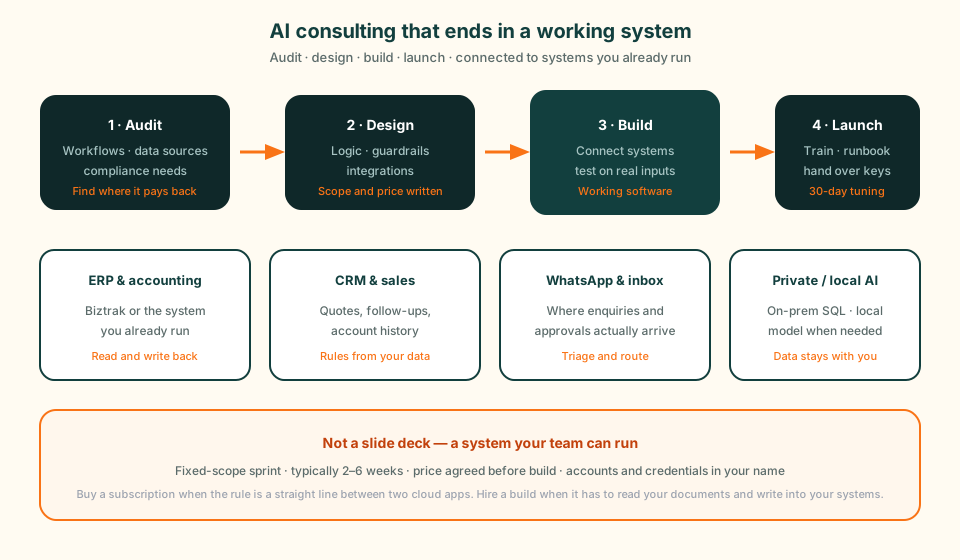
Custom AI Implementation Process
Audit
Map workflows, data sources, and compliance needs.
Design
Define automation logic, guardrails, and integrations.
Build
Develop AI workflows and connect systems securely.
Launch
Train users, monitor results, and improve the workflow.
Kuching, Sarawak Delivery Team
We are based in Kuching, Sarawak. Projects are delivered with clear documentation, training, and ongoing support.
Related AI Services
Fixed-scope automation sprint for fast ROI.
RAG assistants for support and internal teams.
Deploy secure AI in your environment.
Kuching-based AI team serving all of Sarawak.
Agents that act inside your systems, not just answer questions about them.
Custom AI Solutions FAQ
Custom AI solutions connect AI agents to your workflows, documents, and business systems. The goal is to reduce repetitive work such as data entry, approvals, reporting, and customer follow-up.
Most initial workflows can be delivered in 2-6 weeks depending on scope and integrations. Larger programs are delivered in phases.
Yes. We connect AI to ERPs, CRMs, databases, WhatsApp Business, document stores, and internal tools via APIs or secure connectors.
Yes. We support local LLM or private cloud deployments with governance and audit controls.
We start with a workflow audit, then identify the highest-value process, required data sources, access rules, and measurable outcome before building.
Our AI work is priced as fixed-scope sprints, typically RM 8,000-15,000 for a 2-3 week implementation, agreed in writing before we start. The initial workflow audit and scoping call are free, so you see both the scope and the number before committing to anything. Larger programmes are delivered as a sequence of sprints, each with its own scope and price.
Four things, in order. Audit your workflows, data sources, and compliance needs. Design the automation logic, guardrails, and integrations. Build it and connect it securely to your ERP, CRM, WhatsApp, or document systems. Then train your users, monitor the results, and tune it after launch. If the honest answer at the audit stage is that a process should be fixed before any AI touches it, we will say so.
Buy the tool when your process is standard and the tool can already see the data it needs. Custom work earns its cost when the AI has to read your own documents, follow your business rules, and write back into systems you already run. We will tell you which situation you are in during the scoping call, before you have paid for anything.
Usually yes, through a different route: a read-only database view, scheduled exports to CSV or Excel, or a monitored file drop are all workable. We identify the options during the audit and tell you which ones are reliable enough to build on. Where a system genuinely cannot be reached safely, we say so instead of building something fragile that breaks on the first vendor update.
Every integration ships with logging, alerting, and a dashboard that tracks throughput and failures, because the failure mode that actually hurts is the silent one: a connector that stops firing and nobody notices for a fortnight. You get the runbook and the data-flow diagram at handover, so your team can see what broke and where without calling us first.
Book your AI Automation Audit
We’ll identify the fastest workflow to automate and give you a clear build plan.