

AI Workflows for Malaysian Operations
Example AI workflows for finance matching, approval routing, CRM answers, and support triage — built to run inside ERP, CRM, WhatsApp, and the systems you already use. Delivered from Kuching, Sarawak.
How an AI workflow actually runs
A trigger arrives, your rules decide the next step, the workflow acts in the system of record, and anything risky stops for a human. Every action is logged.
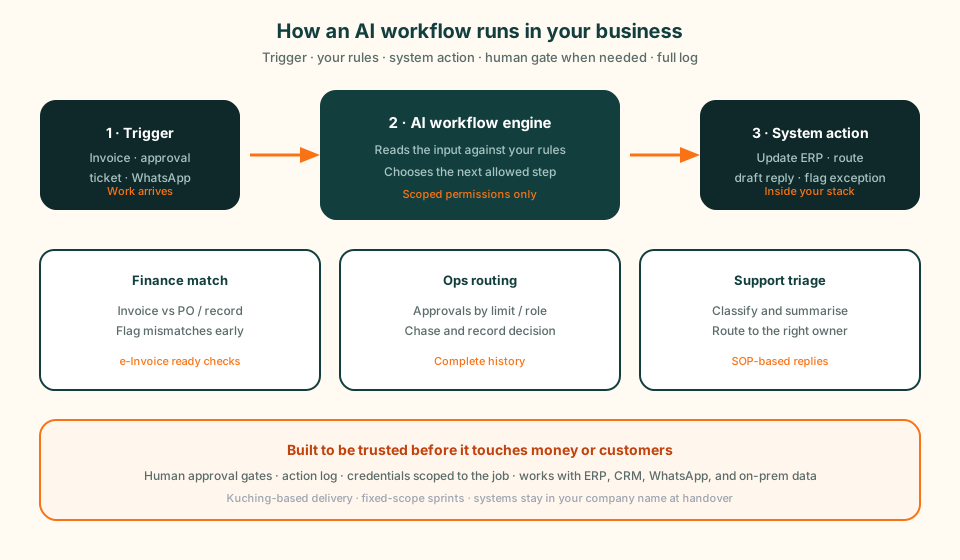
AI workflow examples
Compare a recruitment administration project we built with finance, CRM, and support workflow patterns. Check the inputs, connected systems, and decisions that need a person before choosing a process to automate.
Delivered project: recruitment administration
An email API imports applications and resumes from the HR inbox into a web application. AI suggests department and job-title categories. HR checks those suggestions and sends batches for department review. Department heads select candidates, and HR gives final confirmation before the system generates and sends interview invitations.
Candidate selection stays with people. The published workflow and interface illustrations use fictional records and contain no customer or applicant data.
See the recruitment workflow and review stepsInvoice and Audit Matching
An AI workflow that reads supplier invoices, matches them against purchase orders or ERP records, and flags e-Invoice discrepancies for a person to review.
- Reduced repeated entry
- Exceptions surfaced early
- Complete match history
CRM Query Assistant
A specialised assistant connected to sales and account data so staff can ask plain-language questions about credit trends, open jobs, and customer history instead of exporting spreadsheets.
- Faster internal answers
- Live system data
- Less spreadsheet rework
Support and Enquiry Triage
Workflows that classify enquiries from WhatsApp, email, or tickets, draft replies from approved procedures, and escalate anything that needs a person.
- Improved tracking
- Nothing sitting unread
- Clear escalation path
Built for trust, not demos
Production AI workflows need controlled data access, approval rules, and audit trails before they touch customers or finance. That is the design work that sits around the model.
Private when data cannot leave
Local or private deployment options so documents and customer data stay on infrastructure you control.
Connected to systems of record
Deep integration with Biztrak and other ERP, CRM, database, and messaging APIs — not a tool that only chats.
Malaysian operating context
Built with e-Invoice, PDPA, and bilingual operations in mind for teams in Sarawak and across Malaysia.
Fixed-scope AI sprints
Typically RM 8,000–15,000 · 2–3 weeks · free automation audit first
From example to a live workflow
Most teams start with one painful process: invoices that never match, approvals stuck in WhatsApp, or support queues that only move during office hours. We map that process, name the systems involved, and agree what the workflow may do alone before writing any code.
If you need a single agent with one named job, see AI agent development. If you need a full end-to-end process automated, start with AI workflow automation. For consulting that covers platform choice and custom build, use custom AI solutions.
Related AI services
Pick the service that matches the job, then book the free automation audit.
AI Workflow Automation
Fixed-scope 2–3 week sprints to automate one high-value workflow end to end.
Learn more →AI Agent Development
One agent, one named job, with permission to act inside your systems.
Learn more →Custom AI Solutions
AI consulting and build when the problem is larger than one sprint.
Learn more →Custom Business Chatbot
Knowledge assistants for support, sales, and internal teams on WhatsApp or web.
Learn more →Local LLM & Private AI
On-premise or private deployment when documents cannot leave your infrastructure.
Learn more →AI Automation Sarawak
Kuching-based delivery for Sarawak businesses that want onsite workshops.
Learn more →Technology Partners
Biztrak ERP, Biztrak Online, and FlexHR implementation and support.
Learn more →AI workflows FAQ
What is an AI workflow?+
An AI workflow is a controlled process that starts from a business trigger — an invoice, approval request, support ticket, or WhatsApp message — applies your rules, and then acts inside systems you already run. Unlike a one-off chatbot answer, it updates records, routes work, or files documents with a log of every step.
How is this different from the AI Workflow Automation service page?+
This page shows example workflow patterns and how the engine is structured. The service page is where you start a fixed-scope build: one named workflow, 2–3 weeks, price agreed in writing. Use the examples here to brief the audit, then go to AI Workflow Automation or contact when you are ready to scope.
Can these workflows connect to Biztrak, CRM, and WhatsApp?+
Yes. Most builds connect to ERP or accounting (including Biztrak), CRM, email or shared inboxes, WhatsApp Business, document stores, and databases — including on-premise SQL when the agent or workflow runs inside your network.
Which example is a project GreatRise has delivered?+
The recruitment administration workflow is a project we built: email applications enter a web application, AI suggests categories, HR reviews them, department heads select candidates, and HR confirms interview invitations. The finance, CRM, and support cards describe workflow patterns to scope, rather than named client case studies. No measured savings are published here.
How do we keep AI workflows from acting without permission?+
Each build gets narrow credentials, a written list of actions it may take alone, and human approval gates wherever a wrong step would cost money or trust. Every action is logged with its trigger, inputs, and approver so you can audit what happened.
Automate the routine work first
Move manual matching, routing, and triage into controlled AI workflows so your team spends more time on customers and decisions.