
AI Agents That Work Inside Your Business Systems
An agent that reads your documents, moves approvals, and triages enquiries — with permission to act inside the ERP, CRM, and databases you already run.
Fixed quote. One agent live in 2-3 weeks.
Scoped to one named job, built against your real documents, and handed over with the credentials, the runbook, and a log of everything it did. Built in Kuching, delivered across Malaysia.
Why AI Agent Projects Stall
The pilot answers questions but cannot do anything: no record updated, no approval moved.
The job spans four systems, and the tool you trialled reaches one of them.
The records live in an on-premise ERP or SQL server with no public endpoint.
Nobody can say what the agent did last Tuesday, so nobody trusts it with anything that matters.
What an AI Agent Build Delivers
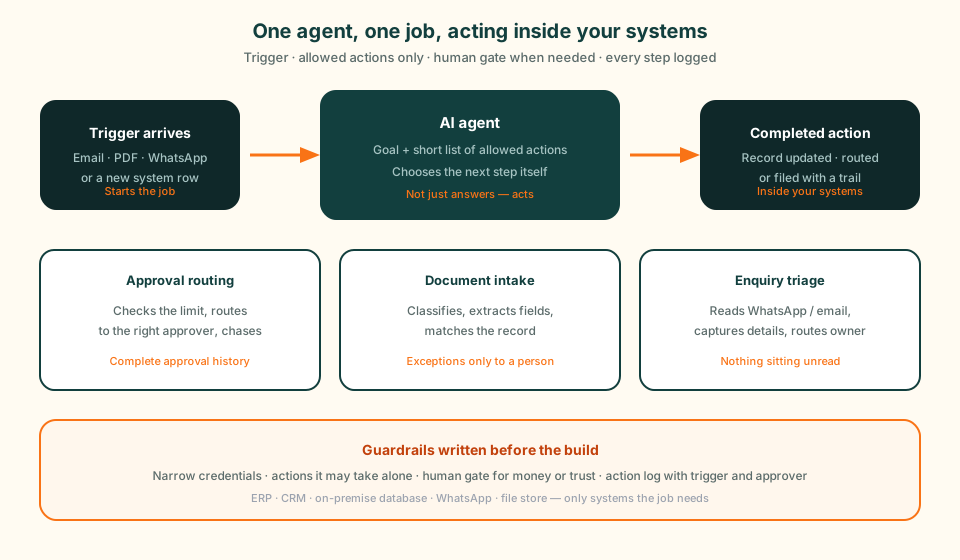
An AI agent is given a goal and a short list of actions it is allowed to take, then decides which of them to take to reach that goal. That is a different thing to buy than a model subscription, so here is what the build actually produces.
Inside an AI Agent Build
One agent, one named job, one agreed scope. The actions it may take on its own — and the ones that always stop for a human — are written into the quote, not discovered in week three.
Fixed scope, typically RM 8,000-15,000
Three AI Agents, Before and After
Approval Routing
Document Intake and Data Extraction
WhatsApp Enquiry Triage
What an AI Agent Actually Does, and How It Differs From a Chatbot
An AI agent is given a goal and a set of actions it is allowed to take, and it decides which of those actions to take to reach the goal. A chatbot is given a question and returns an answer. That is the whole distinction, and everything practical follows from it: an agent changes something in a system of record, and a chatbot does not.
The consequence most demos skip is that this changes what can go wrong. A chatbot that gets something wrong gives a bad answer, and a person catches it. An agent that gets something wrong posts a bad record, routes an approval to the wrong manager, or messages a customer. That is why an agent build spends more design time on permissions, approval points, and logging than on the model itself, and why we write down what the agent may never do on its own before building anything it can do.
Some jobs want one, some want the other, and plenty want both — an agent doing the work, with a chatbot on WhatsApp or your website as the way people talk to it. For the longer explanation with worked examples, our guide to AI agents versus ordinary apps covers where each one earns its place.
| The question | A chatbot | An agent |
|---|---|---|
| What it is given | A question from a person. | A goal, plus a list of actions it is allowed to take. |
| What it produces | An answer, cited back to a source document. | A completed action: a record updated, an approval routed, a document filed. |
| What starts it | A person, by asking. | A trigger: an email arriving, a schedule, a new row, a status change. |
| What a mistake costs | A wrong answer, which a person can catch before acting on it. | A wrong action inside a live system, which is why write access is gated. |
| What it needs to work | Documents worth answering from. | Permission to act, and somewhere to log what it did. |
Where an AI Agent Plugs Into Your Systems
An agent is only as useful as the systems it can reach. The question that decides most projects is not which model to use. It is whether the system holding your records can be read from, and written to, safely.
Most of what we connect sits in one of a few places: an ERP or accounting system such as Biztrak, a CRM, a database on a server in your own office, or the messaging channel where the work actually arrives. Where a system has no API there is usually still a route — a read-only database view, a scheduled export, or a monitored file drop. We map those routes before quoting, and the connector, monitoring, and error-handling side of that work is covered on our AI consulting page.
ERP and accounting
Read orders, invoices, and balances, then write validated entries back with an audit trail. Biztrak, or whichever system you already run.
CRM and sales records
Read the account history before drafting anything, and write the outcome back so the next person sees what happened.
On-premise databases
A SQL Server or PostgreSQL instance can be reached from inside your network with the right permissions. Cloud platforms may connect through supported gateways, agents, or middleware; check both access and where processing happens.
WhatsApp and shared inboxes
Where enquiries, orders, and approvals actually arrive in Malaysian businesses, whatever the official process says.
MyInvois and e-Invoice
Extract and validate invoice data ahead of submission through your accounting system, so the compliance step stops being retyping.
Files and document stores
SharePoint, Google Drive, or a watched folder — where the PDFs that start most workflows are sitting today.
What an AI Agent Costs in Malaysia
Our AI work is sold as fixed-scope sprints, typically RM 8,000-15,000 for a 2-3 week implementation, and an agent is quoted the same way: one agent, one named job, one price agreed in writing before the build starts. A second agent is a second sprint, quoted on its own.
The number moves for reasons you can predict, and we would rather you predicted them before the quote arrived than after. Running costs sit outside the build price entirely: model usage is billed per token by whichever provider the agent uses, and if it runs on WhatsApp, Meta bills the messaging separately. Our free AI token cost converter gives you a monthly estimate in MYR before you commit to anything.
When an AI Agent Is the Wrong Tool
Plenty of the jobs people ask us to quote as agents should not be agents. We would rather say so on the scoping call than three weeks into a build, so here is the disqualifier list up front.
If any of these describe your situation, the honest answer is something else — a scheduled report, a form, a fix to the underlying system, or nothing at all. We will tell you which before you have paid for anything.
What to Ask Anyone Building You an AI Agent
This checklist is useful whether or not you hire us. Every question below is one where a weak provider gives a vague answer, and the vagueness is the signal. Ask us the same ones.
Ask what it may do without asking
The list of actions the agent can take alone should be written down, and short. If nobody can produce that list, nobody has designed the guardrails.
Ask what it logs
Every action, its trigger, its inputs, and who approved it. Without that record you cannot audit a decision or debug a bad one.
Ask what happens on the bad day
How a failure is detected, who is alerted, what the fallback is, and whether the manual process still works while the agent is down.
Ask whose name is on the accounts
Hosting, API keys, and model credentials belong in your company name from day one. If they sit in the vendor account, you are renting your own agent.
Ask where the documents go
Which model processes them, in which region, retained for how long, and whether it can run locally when the data cannot leave the building.
Ask what month two costs
The build price is one number. Ask for the monthly one: model usage, hosting, and what happens to it if volume doubles.
Background Reading Before You Brief Anyone
These guides explain agent capabilities and practical workflows to help you prepare a project brief.
The plain-language version: what makes something an agent, and when an ordinary app is the better answer.
The latest verified release and practical designs for daily briefs, approval reminders, and reviewed reports.
Pick one daily pile a small business already opens: invoices, WhatsApp, leave, or statements.
Not sure whether you need an agent or a report?
Describe the job. If a scheduled report or a form solves it, we will say so and you can keep your budget.
Systems an AI Agent Connects To
Permissions, Logs, and Where the Data Sits
Keep control of your data and comply with internal governance. We can deploy in your environment with clear retention and access rules.
How We Scope, Build, and Hand Over an Agent
Scope the Job
Name the one job the agent does, the systems it touches, and the actions it may never take on its own.
Design the Guardrails
Agree the approval points, the escalation path, and what the agent does when a system it depends on is down.
Build and Test
Build against your real documents and real edge cases, then run it beside the manual process before it takes over.
Launch and Hand Over
Training, runbook, admin access, and credential transfer, then 30 days of tuning once real work starts arriving.
Who You Would Be Hiring
We are based in Kuching, Sarawak. Projects are delivered with clear documentation, training, and ongoing support.
Related AI Services
When the job is a whole workflow end to end rather than one agent with one task.
The conversation side: answering from your own documents on WhatsApp or your website.
Consulting and build for when the problem is bigger than one agent.
AI Agent Malaysia FAQ
An AI agent is software given a goal and a set of actions it is allowed to take, which then decides which of those actions to take to reach the goal. In a business that usually means reading something that arrived — an email, a PDF, a message, a new record — working out what it is, checking it against your rules, and then doing something: updating a system, routing an approval, drafting a reply, or escalating to a person. The defining feature is that it acts, rather than only answering.
A chatbot answers a question a person asked. An agent completes a task a trigger started. A chatbot that gets it wrong gives a bad answer someone can catch before acting on it; an agent that gets it wrong writes a bad record into a live system, which is why an agent build spends most of its design time on permissions, approval points, and logging. Many businesses end up with both: the agent does the work, and a chat interface is how people talk to it.
Our AI work is priced as fixed-scope sprints, typically RM 8,000-15,000 for a 2-3 week implementation, and an agent build is quoted the same way: one agent, one named job, one price agreed in writing before the build starts. The number moves with how many systems the agent has to reach, how messy the inputs are, how many actions need a human approval step, and whether processing has to stay on infrastructure you control. Running costs are separate: model usage is billed per token by the provider, and WhatsApp messaging is billed by Meta.
Two to three weeks for one agent with a clearly named job. The scoping workshop runs in the first few days, the build and integration take the middle, and the last stage runs the agent alongside the existing manual process before it takes over. What pushes a project past three weeks is almost never the build — it is waiting on access to a system, or discovering that the business rules everyone described are not the rules actually being applied.
Yes. We assess APIs, read-only database views, scheduled exports, and monitored file drops. An on-premise database may be reached from inside your network or through a supported gateway, agent, or middleware. We confirm permissions, connector requirements, and the complete data path before quoting; local access does not mean all processing stays local.
Handle inputs nobody standardised, and decisions that need context. A script does the same steps in the same order every time, which is exactly right when the rule is a straight line. An agent earns its cost when the input is forty different supplier invoice layouts, an enquiry written in mixed English, Malay, and Chinese, or a request that has to be checked against a policy before anyone acts on it. If your rule is genuinely if-this-then-that, a script is cheaper and breaks less often, and we will tell you so.
When the rule is a straight line with no judgement in it. When the underlying process is broken rather than slow, because an agent running a bad process only produces bad outcomes faster. When the job runs a handful of times a month and the build cannot pay back. When nobody internally will own it. And when the data it would need does not exist in any system yet — capture it first, automate it second. We would rather say this on the scoping call than in week three.
By deciding what it may do before it is built, not after. The agent gets its own credentials with the narrowest permissions the job needs rather than a shared admin login, the actions it may take alone are written into the scope document, and everything else stops for a human approval. Every action is logged with its trigger, its inputs, and who approved it, so a decision can be audited afterwards. Write access to anything financial or customer-facing stays gated by default.
Yes. Where documents cannot leave your infrastructure, the model runs inside your environment or private cloud instead of calling a public API. That changes the shape of the cost rather than only the number: you take on the hosting and hardware, and the choice of model narrows to what runs well on the machine you have. We scope it with you rather than assuming it, because for many workflows the sensitive fields can be masked before anything reaches a model at all.
You do. Hosting accounts, API keys, and model credentials are in your company name from day one, and handover includes documentation, a runbook for what to do when a run fails, admin access, and training. Thirty days of tuning after go-live are included, because the first weeks of real inputs always surface edge cases a workshop cannot. After that, ongoing support is available under a separate agreement if your team would rather not own it.
Tell Us What You Want an Agent to Take Off Your Team
One job, one call. You will leave knowing whether it should be an agent, something simpler, or nothing at all.