AI Document Processing Malaysia

AI Document Processing That Posts Into Your Systems

Classify the file, extract the fields, check them against your rules, then send clean data to accounting or a person.

AI document processing in Malaysia is the pipeline that sits between the inbox and the system of record. GreatRise builds that pipeline from Kuching: capture, classification, extraction, rule checks, and posting, with staff reviewing only the items the pipeline is unsure about.

Where Document Work Consumes Staff Time

Staff open each PDF just to decide what it is and which folder it belongs in.

The same supplier name, amount, and date get typed into more than one system.

Invoices arrive as WhatsApp photos and sit unread until someone keys them in.

Finding last year’s document depends on whoever named the folder.

A mixed inbox of invoices, delivery orders, and statements gets sorted by hand every morning.

Finance retypes figures that already exist on a PDF before they can reach Biztrak or MyInvois.

What an AI Document Processing Project Includes

AI document processing for a Malaysian business reads the files your team currently retypes. It classifies each one, pulls the fields the next system needs, checks totals and identifiers against your rules, and posts the clean records. People still see every low-confidence item. The time saving is that they stop typing the rest.

Incoming files classified and routed: invoice, statement, delivery order, claim, form.
Fields extracted from PDFs, scans, and phone photos into structured records.
Totals, dates, and identifiers checked before anything is accepted.
Clean data posted to Biztrak, Excel, or the system you already run.
A searchable archive that keeps the source file with the extracted record.
A review queue for low-confidence items, with a processing log.
English, Malay, and Chinese documents tested on your real samples.

What You Get in a Document Processing Sprint

A fixed-scope build for one document type and one landing system, with classification, extraction, rule checks, and the review step agreed before anything posts live.

Fixed scope, typically RM 8,000-15,000

Document audit: types, volumes, sample files, and where each record must land.
Classification and extraction configured on your real layouts.
Validation rules and the human-review queue designed with the team that owns the work.
Connection to Biztrak, Excel, a shared drive, or your existing API.
Training, a processing log, and a tuning period once live files start arriving.

Document Workflows in Practice

Inbox Attachments to Filed Documents

Before: A shared inbox fills with mixed attachments someone sorts every morning.
After: Documents are classified (invoice, DO, statement, claim) and routed to the right queue.
Impact: The morning sorting job disappears.

Supplier File to Accounting Draft

Before: Staff open each invoice and type supplier, dates, tax, and lines into accounting.
After: The file is extracted and checked; a draft lands in Biztrak or your ledger for review.
Impact: Reduced repeated entry on the documents that arrive every week.

Delivery Orders to System Records

Before: DOs are matched to orders by hand before goods are booked in.
After: DO data is extracted and matched to the PO; mismatches are flagged.
Impact: Receiving keeps moving; exceptions get attention.

Claims With Supporting Documents

Before: Staff check each claim by hand against receipts and policy rules.
After: Receipts are extracted and checked against the rules; clean claims flow through.
Impact: Consistent checking without reading every attachment from scratch.

Statement Pages to Reconciliation Work

Before: Juniors re-key statement lines before anyone can match them to the ledger.
After: Lines are extracted and balance-checked; staff review only the unmatched items.
Impact: Reconciliation becomes review, not data entry.

Scanned Boxes to a Searchable Archive

Before: Years of paper sit in boxes nobody can search when an auditor asks.
After: Batches are indexed; a document is findable by supplier, date, or amount.
Impact: Allowed online access to files that used to live in a storeroom.

What AI Document Processing Is

AI document processing is software that takes a file your staff would otherwise open, decide, and retype, then does those three jobs in order. It names the document type. It pulls the fields the next system needs. It checks those fields against rules you already use, and it either posts a clean record or puts the file in front of a person with the extracted values filled in.

That last step is the whole production design. A tool that only turns pixels into text still leaves someone to interpret the page. A pipeline that classifies, extracts, checks, and posts is what replaces the retyping. We build the pipeline around your documents and the system the data must reach.

Most Malaysian finance teams start with one of two piles: supplier invoices, or bank statements. Those have their own pages. This page is the wider job: mixed inboxes, delivery orders, claims, forms, and the archive you still cannot search.

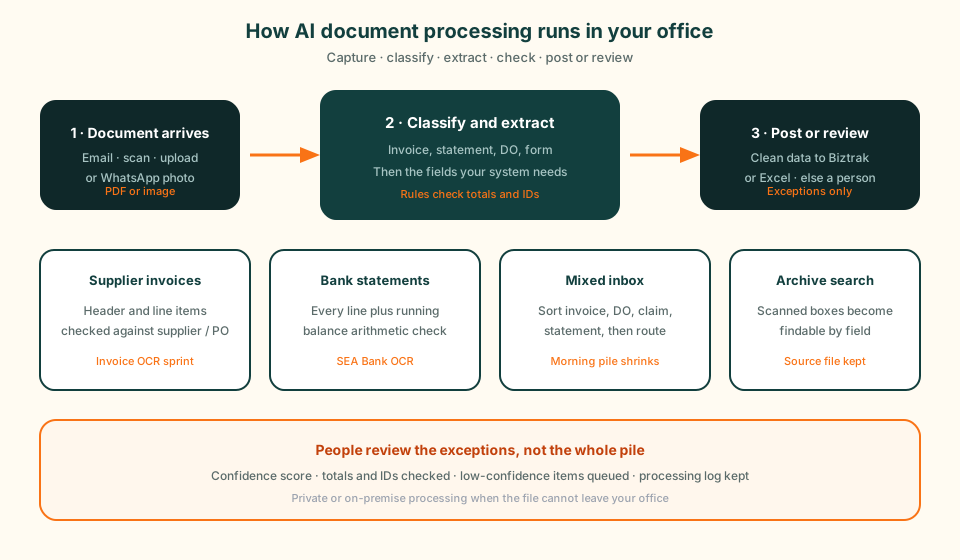
Diagram of AI document processing in Malaysia: a file arrives by email, scan, or WhatsApp photo; the pipeline classifies it and extracts fields; clean data posts to Biztrak or Excel, and low-confidence items go to a person.
Capture, classify, extract, check, then post. Staff review the exceptions, not the whole pile.

Documents This Pipeline Handles

Supplier invoices and bills, including WhatsApp photos
Receipts and payment vouchers
Bank statements from the banks you actually use
Purchase orders and delivery orders
Application and registration forms
Claims and the receipts attached to them
Contracts and agreements, key terms only
Scanned archives that need to become searchable

A Generic OCR Tool Versus a Pipeline We Build

A subscription extractor is the right buy when one person uploads a few clean PDFs and is happy to copy the result into Excel. The moment the files arrive from email and WhatsApp, the layouts vary, and the record has to land in accounting with a review step, you are buying a workflow, not a reader.

We quote the workflow. Capture from the channel you already use. Classification so mixed files do not share one template. Extraction tuned on your samples. Rules that catch totals that do not add up, unknown suppliers, and duplicate numbers. A queue for anything the pipeline will not stand behind. Then a connection to Biztrak, Excel, or the API you already run.

The jobGeneric OCR toolPipeline we implement
What arrivesSomeone uploads a file.Email, scan, upload, or WhatsApp photo.
Mixed types in one inboxOne template, or you sort first.Classify, then extract with the right fields.
Checking the numbersYou read the export.Rules catch totals, IDs, and duplicates.
Where the data goesDownload CSV and re-import.Draft in Biztrak, Excel, or your system.
When it is unsureGuesses, or stops.Queues the file with values filled in.
Keeping it currentYou reconfigure the tool.We tune rules on live exceptions.

Work We Have Already Shipped

The proof for this page is a product we operate and the invoice-to-accounting work we implement as a Biztrak partner. We do not publish client names. References are shared in a meeting when the client allows it.

SEA Bank OCR, a live statement converter we operate

Customer situation

Accounting teams and firms in Malaysia need statement lines in Excel or a system, not a PDF they have to re-key. Each bank lays the page out differently.

Existing problem

Staff typed date, description, debit, credit, and balance line by line. One mistyped amount threw the reconciliation out. There was no single template that fitted every bank.

GreatRise solution

We built and operate SEA Bank OCR. Upload a statement PDF, get structured lines out. Parsers cover 11 or more Malaysian banks including Maybank, CIMB, Public Bank, and RHB. Mixed English, Malay, and Chinese statements are in scope. Files are encrypted in transit and at rest, then removed once conversion finishes.

BeforeOpen PDFType each lineHope the balance still matchesStart reconciliation
AfterUpload statementLines extractedBalance check flags errorsReview unmatched items

Key functions

Per-bank statement parsersDate, description, debit, credit, balanceRunning-balance arithmetic checkExcel, CSV, or JSON exportFree starter plan, 5 pages a month

Integration: Self-serve at seabankocr.com. Paid plans from RM99 a month. Integration into an accounting workflow is a separate scoped project.

Business result

  • Connected statement PDFs to clean transaction data
  • Improved tracking for reconciliation review
  • Reduced repeated entry of statement lines
  • Allowed online access to a converter finance teams can use the same day

Invoice files into a Biztrak draft, not another spreadsheet

Customer situation

Finance teams that already run Biztrak still type supplier invoices because the file arrives as a PDF or a phone photo. The figures exist. They are just not in the ledger.

Existing problem

Staff downloaded attachments, read supplier, dates, tax, and lines, and keyed them into accounting. Typing errors showed up later as reconciliation problems. Month-end grew a backlog of unprocessed invoices.

GreatRise solution

We implement an invoice pipeline as a certified Biztrak partner: capture from email, scan, or photo; extract header and line items; check supplier records, POs, and amount rules; post a draft the finance team reviews. Low-confidence items stay in a queue instead of being guessed into the books.

BeforeDownload attachmentType into accountingFix errors at month endSearch folders later
AfterFile enters pipelineFields extracted and checkedDraft in BiztrakSource file searchable

Key functions

Capture from email, scan, or photoHeader and line-item extractionSupplier, PO, and amount checksDraft posting into BiztrakHuman review for exceptions

Integration: Validated invoice data flows into the Biztrak accounting workflow. e-Invoice / MyInvois stays on the accounting system; this pipeline stops the retyping that sits in front of it.

Business result

  • Reduced repeated entry of supplier invoices
  • Connected previously separate capture and posting steps
  • Improved tracking of what was extracted, checked, and posted
  • Created a complete processing history for each file

Who This Work Is For

This sprint fits a team that already has a pile and a destination. Someone in finance, receiving, or a professional firm spends part of every week opening the same class of file and typing it into a system that already exists.

Finance teams on Biztrak

Supplier files and statement pages still typed into a ledger that can accept a draft.

Accounting firms

Client statements and invoices that juniors re-key before any real review starts.

Trading and receiving

Delivery orders matched to purchase orders by hand at the door.

Shared inboxes

One mailbox that mixes invoices, DOs, claims, and statements every morning.

Private or on-premise needs

Files that cannot leave the office. We deploy extraction inside your environment.

Wrong fit, and we will say so

A few clean PDFs a month belong in a self-serve tool. Start with SEA Bank OCR if statements are the only pile.

Accuracy, and What Happens When the Pipeline Is Unsure

No extractor reads every Malaysian document perfectly. Phone photos, stamps, and mixed handwriting break fields. Vendors who promise a perfect read are selling the demo, not the month after go-live.

We score confidence on the extracted fields. Business rules then catch what a score misses: totals that do not add up, unknown suppliers, duplicate invoice numbers, statement lines whose running balance fails. Anything that fails a check goes to a person with the values already filled in. Your team confirms or corrects. They do not start from a blank form.

That is where the time comes from. Review is faster than typing. The processing log records what was read, what was checked, who accepted it, and which source file it came from.

Where Extracted Data Lands

Extraction that stops at a CSV still leaves a person to import it. The sprint includes the landing step you actually need. For many Sarawak finance teams that is a draft in Biztrak. For others it is Excel, a SQL table, or a folder the next workflow already watches.

LHDN MyInvois is a separate submission from your accounting system. This pipeline does not replace MyInvois. It stops staff retyping a supplier PDF before the invoice can exist in the ledger that submits. If the work after posting is an approval or a match, that sits on AI workflow automation. If the file cannot leave the building, see private or local AI.

What a Document Processing Sprint Costs

A build with us is a fixed-scope sprint, typically RM 8,000-15,000, covering one document type and one landing system. That includes the sample audit, extraction and classification, rule checks, the review queue, the connection, and training. What moves a project toward the upper end is the number of layouts, whether files arrive from more than one channel, and whether the landing system needs an API rather than Excel.

Bank statements have a second path that is not a sprint. SEA Bank OCR is self-serve, with a free starter plan of 5 pages a month and paid plans from RM99 a month. Use that when you only need a converter. Ask us to integrate it when the lines must land in accounting without a download step.

Model usage, if the extractor calls a hosted model, is billed by the provider. We give you a monthly estimate in MYR before you commit. Our token cost converter is the same tool we use on other AI sprints.

Which documents does your team read and retype every day?

List the types and where the data must go. We will tell you which pile is worth a sprint, and which one belongs in a self-serve tool.

Discuss Your Business Problem

Where the Data Lands

Biztrak accountinge-Invoice / MyInvoisEmail and shared inboxesWhatsApp BusinessGoogle Drive or SharePointSQL databasesREST APIsExcel and CSV exportDocument management systems

Data Control and PDPA

Keep control of your data and comply with internal governance. We can deploy in your environment with clear retention and access rules.

Private and on-premise processing when the file cannot leave your office.
Role-based access to documents and extracted data.
Full processing and review logs: what was read, checked, posted, and by whom.
Retention rules agreed before launch, not left at a vendor default.
Personal data handled under the Personal Data Protection Act 2010.

How We Implement Document Processing

01

Audit

Collect sample files, name the types, and write down where each record must land.

02

Design

Classification, fields, validation rules, and the review queue per document type.

03

Build and connect

Pipeline wired to the inbox, the landing system, and the archive.

04

Launch and tune

Go live on one type, watch the exception queue, then add the next type.

A Kuching Team With Long-Term Experience

We are based in Kuching, Sarawak. Projects are delivered with clear documentation, training, and ongoing support.

Since 2009
Delivering business systems from Kuching, Sarawak since 2009.
Accounting-Aware
Certified Biztrak partner — we understand where the data must land.
Local, Long-Term Support
Onsite delivery in Sarawak with English, Malay, and Chinese support.

AI Document Processing Malaysia FAQ

What is AI document processing?

A pipeline that classifies an incoming file, extracts the fields the next system needs, checks them against your rules, and posts a clean record. People review only the items the pipeline will not stand behind. The source file stays with the extracted record so you can open what was read.

How is this different from plain OCR?

OCR turns an image into text. AI document processing names the document type, picks the values that matter, and checks whether those values are consistent. The classification, the rule checks, and the posting step are what stop someone from interpreting a raw text dump.

Which documents should we automate first?

The pile your team retypes most often. For most Malaysian finance teams that is supplier invoices or bank statements. We look at volume and the cost of a wrong figure during the audit, then start with one type so the review queue stays small at launch.

Can it handle Malay and Chinese documents?

Yes. Many Malaysian files mix English, Malay, and Chinese on the same page. We test extraction on your real samples before go-live. SEA Bank OCR already handles mixed-language bank statements in production.

What about sensitive documents and PDPA?

Processing can run on private or on-premise infrastructure so files never leave your environment. Access is role-based. Every extraction and review is logged. Retention is agreed before launch. That is how we treat personal data under the Personal Data Protection Act 2010.

What document processing have you already delivered?

We operate SEA Bank OCR, a live converter for Malaysian bank statements covering 11 or more banks, with running-balance checks and Excel, CSV, or JSON export. We also implement invoice pipelines that extract supplier files and post drafts into Biztrak. We do not publish client names; references are shared in a meeting when the client allows it.

How much does AI document processing cost in Malaysia?

A fixed-scope sprint is typically RM 8,000-15,000 for one document type and one landing system: audit, extraction, rule checks, review queue, connection, and training. SEA Bank OCR is separate and self-serve, from a free 5-page starter plan to paid plans from RM99 a month. Model usage, if any, is billed by the provider.

Can extracted data go into Biztrak?

Yes. We are a certified Biztrak partner. Validated invoice data and extracted bank lines can land as drafts in the accounting workflow rather than as another spreadsheet. MyInvois submission stays on the accounting system; the pipeline removes the retyping in front of it.

What happens when the pipeline does not trust the extraction?

The file goes to a person with the extracted values filled in. Staff confirm or correct. Nothing guessed is posted. The log records the confidence, the failed rule, and who accepted the correction.

Do I need this page or a single-document build?

If the pile is only supplier invoices, use the invoice page. If the pile is only bank statements, use the statement page or SEA Bank OCR. Use this page when the inbox is mixed, when you need classification first, or when the same pipeline has to grow from one type to several.

Do we have to replace our accounting system?

No. The point of the sprint is to feed the system you already run. We connect to Biztrak, Excel, a database, or an API. Replacing the ledger is a different project, and we will say so if that is what you actually need.

Send Us Ten Sample Files

A mixed week of invoices, statements, or forms is enough. We will show you what the pipeline can extract and what a person would still need to review.