
Do You Need OpenClaw? A Simple Decision Guide for Malaysian Businesses
OpenClaw can handle serious automation work, but it is not for every business. This decision flowchart helps Malaysian teams judge fit by workflow, budget, and technical capability.
Check Fit Before You Install OpenClaw
OpenClaw has 60,000 GitHub stars, Nvidia backing, and a growing developer community building skills for it. That attention does not make it right for every business. OpenClaw solves specific problems, and if those problems are not yours, setup time will be wasted.
Before you install it, answer five simple questions. The decision flowchart below keeps the choice practical.
The Decision Flowchart
Follow the chart below. Start at the top and follow the arrows based on your answers.
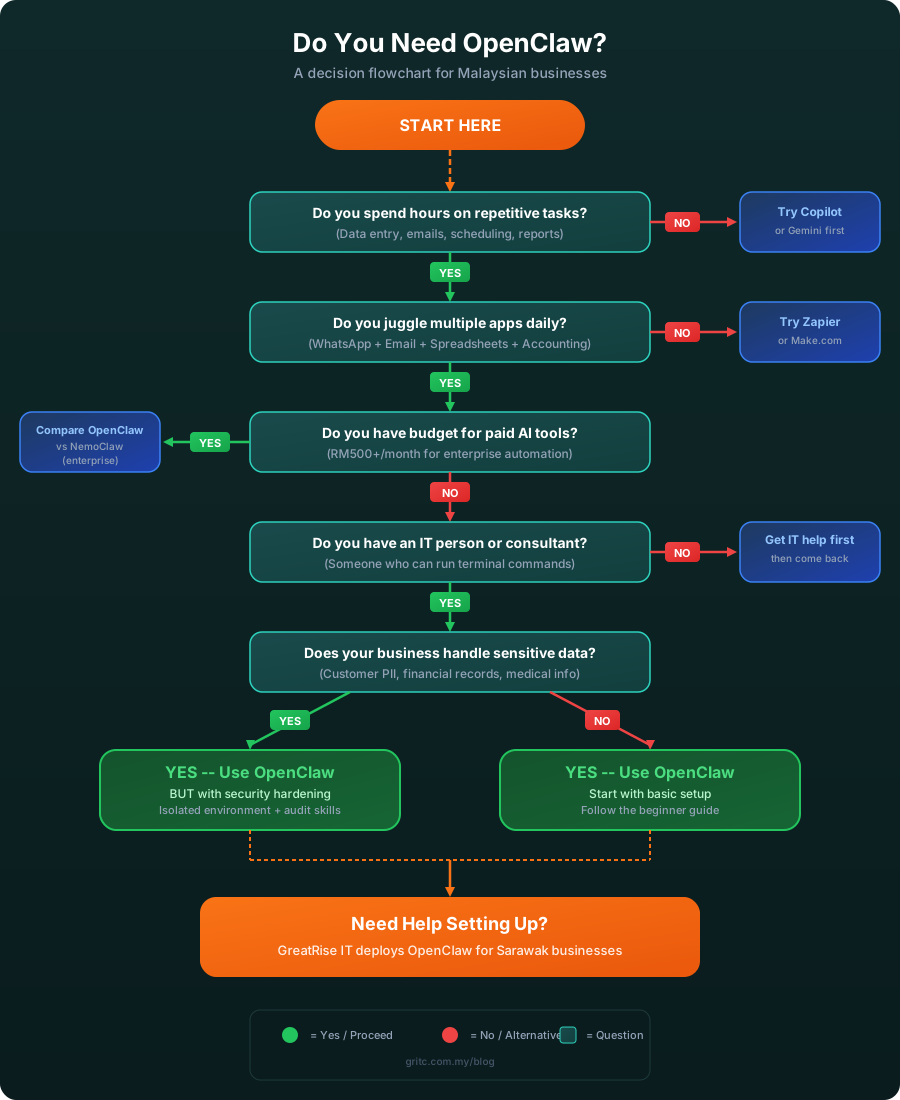
Decision flowchart: Do You Need OpenClaw? Follow the questions to find out.
Question 1: Do You Spend Hours on Repetitive Tasks?
Repetitive cross-system work is the main reason businesses adopt OpenClaw. If your team spends significant time copying data between systems, sending routine emails, generating weekly reports, or scheduling meetings, OpenClaw may help. If your work is mostly creative, planning-heavy, or client-facing with little repetition, a simpler AI assistant like Microsoft Copilot or Google Gemini might be enough.
Question 2: Do You Juggle Multiple Apps Daily?
OpenClaw works best when it connects fragmented tools. It can read a WhatsApp message, pull data from a spreadsheet, enter it into your accounting software, and send a confirmation email in one automated flow. If your workflow lives inside a single platform, such as Google Workspace, a tool like Zapier or Make.com might handle the automation with less setup overhead.
Question 3: Do You Have Budget for Paid AI Tools?
OpenClaw itself is free and open source. If your business has budget for enterprise tools, compare it with NemoClaw, the Nvidia-backed enterprise version announced at GTC 2026. NemoClaw includes built-in security features, compliance tools, and managed hosting. Businesses that prefer zero software cost and full control can still choose OpenClaw. You only pay for LLM API calls such as GPT-5, Claude, or Gemini, which usually cost under RM50 per month for a small team.
Question 4: Do You Have an IT Person or Consultant?
OpenClaw runs as a Node.js service on a computer or server. Setup requires someone comfortable with terminal commands, environment variables, and API keys. If your business does not have that skill in-house, get IT help first. An IT consultant can set up OpenClaw, configure the security boundaries, and train your team to use it safely.
Question 5: Does Your Business Handle Sensitive Data?
OpenClaw has shell access, can browse the web, send emails, and execute code on your machine. If your business handles customer personal data, financial records, or medical information, deploy OpenClaw in an isolated environment with proper security hardening. This means:
- Running OpenClaw in a Docker container or virtual machine instead of your main workstation.
- Using separate service accounts instead of your personal email or admin credentials.
- Auditing every third-party skill before installing it because some have been found to leak data.
- Setting up logging so you can review what OpenClaw does on your behalf.
- Working with a security-aware IT consultant to configure the boundaries.
If your business does not handle sensitive data (for example, you run a content agency or a retail shop with no customer database), you can start with the basic setup from our OpenClaw beginner setup guide and add security layers as you grow. If you are still weighing agents against conventional apps, the AI agent vs app comparison covers the differences.
The Quick Summary
- OpenClaw IS for you if: you do a lot of repetitive work across multiple apps, you have or can hire technical support, and you want serious automation without paying for enterprise licenses.
- OpenClaw is NOT for you if: your work is mostly creative with little repetition, you only use one platform, or you have no access to technical support.
- OpenClaw NEEDS extra care if: you handle sensitive customer or financial data. Security hardening is required.
What If You Are Still Unsure?
A small pilot is the safest way to decide. Pick one repetitive task, such as automating your daily sales report or routing customer enquiries from WhatsApp to the right person. Set up OpenClaw for that single use case, measure the time saved, and decide from there. You do not need to automate your entire business on day one.
Malaysian businesses can also check the Budget 2026 SME digitalisation grants and the proposed extra 50% tax deduction for SME spending on AI training. If you qualify, these incentives can reduce the cost of a controlled AI pilot. Prefer a done-for-you option instead of self-hosting? A fixed-scope AI workflow automation sprint delivers the same outcomes with support and handover.
Leaning Toward Yes? Start Here.
Download our free OpenClaw install guide with setup steps, Telegram bot configuration, LLM options, and a security checklist for business deployment.
Related Articles
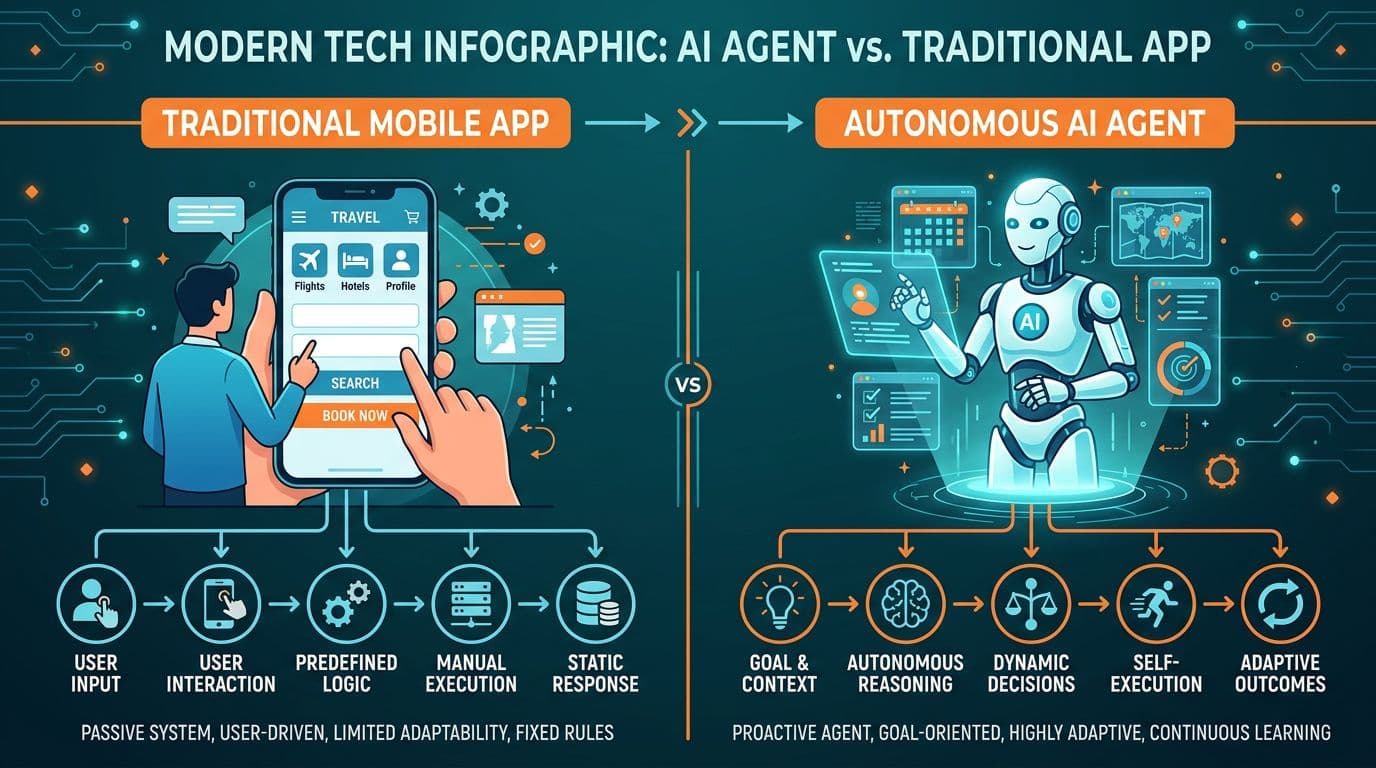
AI Agent vs App: What Is the Difference and Why Malaysian SMEs Should Care
Read article